
S7 PLC Control – Siemens S7 PLC Data Monitor & Controller
S7 PLC Control is an industrial communication and polling application developed for Siemens PLCs (S7-1200, S7-1500, S7-300, S7-400, LOGO! and S7-200) over Ethernet (ISO-on-TCP / S7comm Port 102). It provides real-time monitoring, polling, and writing for Digital Inputs (I), Digital Outputs (Q), Analog Inputs (AI), Analog Outputs (AQ), Markers/Flags (M) and Data Blocks (DB).
It provides modern Dark and Light themes, real-time WebSockets, live trend charting and double-click execution on **Windows 10 & Windows 11**.
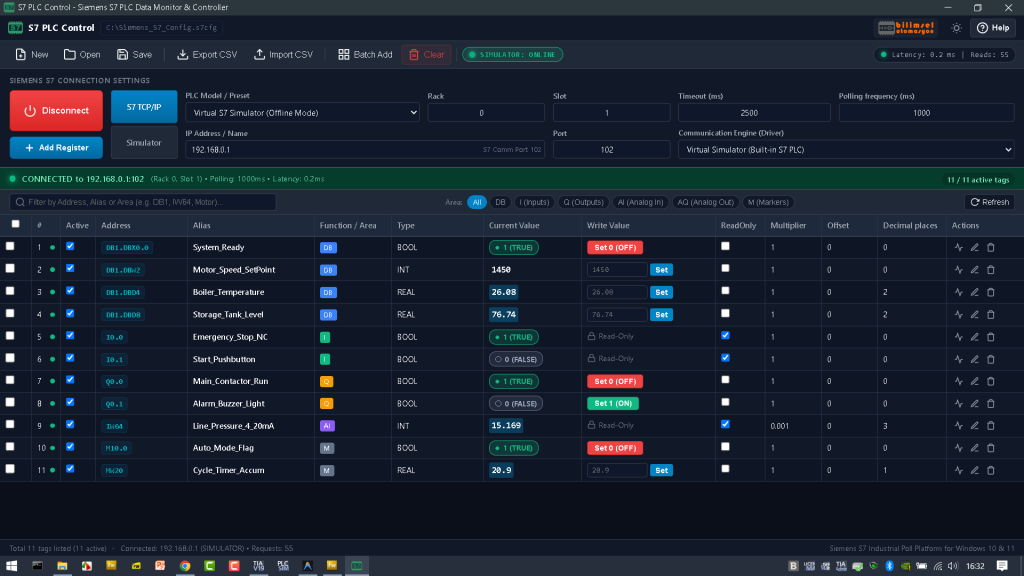
S7 PLC Control Endüstriyel Haberleşme Yazılımı
Not: Kurumunuza özel yazılım ve profesyonel destek için lütfen 05058881208 numaralı telefonumuzu arayınız.
🌟 Key Features
1. **Comprehensive Siemens S7 Protocol Support:**
– **Data Blocks (DB):** `DB1.DBD4` (Real), `DB1.DBW2` (Int), `DB1.DBX0.0` (Bool), `DB1.DBB0` (Byte), etc.
– **Digital Inputs (I / E):** `I0.0`, `I0.1`, etc.
– **Digital Outputs (Q / A):** `Q0.0`, `Q0.1`, etc.
– **Analog Inputs (AI):** `IW64`, `PEW256`, etc.
– **Analog Outputs (AQ):** `QW64`, `PAW256`, etc.
– **Markers / Merkers (M):** `M0.0`, `MW10`, `MD20`, etc.
2. Supported Data Types:
– `BOOL` (1-bit True/False)
– `BYTE` / `USINT` (8-bit Unsigned 0..255)
– `SINT` (8-bit Signed -128..127)
– `INT` (16-bit Signed -32768..32767)
– `UINT` / `WORD` (16-bit Unsigned 0..65535 / Hex)
– `DINT` (32-bit Signed -2.14B..2.14B)
– `UDINT` / `DWORD` (32-bit Unsigned)
– `REAL` (32-bit IEEE 754 Floating Point)
– `STRING` (Siemens S7 ASCII String)
3. Bi-Directional Real-Time Communication (Read & Write):
– **Instant Inline Writing:** Click `Set 1 (ON)` / `Set 0 (OFF)` for BOOL tags, or enter a numeric value into the inline text box and click `Set` (or press Enter).
– **Modify Tag Dialog:** Double-click any row or click the pencil icon (`Modify Tag`) in the Actions column to adjust the tag address, alias, scaling, and write a new value immediately.
– **Non-blocking DOM Updates:** Entering numbers in the Write Value column is never erased by background polling updates.
– **ReadOnly Protection:** Protect physical inputs or critical registers with the Read-Only checkbox.
4. Scaling & Calibration (Multiplier, Offset, Decimals):
– Convert raw sensor readings to engineering units:
$$\text{Display Value} = (\text{Raw PLC Value} \times \text{Multiplier}) + \text{Offset}$$
– When writing a value back, the inverse scaling formula is automatically applied to send the exact raw integer/float down to the PLC.
5. Built-in Virtual S7 PLC Simulator (Offline Testing):
– Test all features immediately without physical hardware.
– Includes simulated physical processes: oscillating tank levels, motor speed ramping, and pressure sensors.
– **Persistent Manual Writes:** Values written manually in simulator mode persist and are not overwritten by background simulations.
6. Live Trend Chart:
– Click the chart icon on any row to open a real-time animated Canvas line chart showing the last 60 polled samples, along with live Min, Max, Current, and Average values.
7. Modern Dark & Light Themes:
– Toggle instantly between SCADA Dark Theme and classic Industrial Light Theme. Your preference is saved automatically.
8. Configuration & CSV Import/Export:
– Save and open `.s7cfg` JSON project files.
– Import and export tag lists in Excel-compatible CSV format.
– **Batch Add Wizard:** Generate multiple sequential tags in one click.
⚙️ Siemens TIA Portal Configuration
When connecting to real S7-1200 or S7-1500 PLCs, ensure the following settings are enabled in TIA Portal:
1. **Permit PUT/GET Communication:**
– Open CPU **Device configuration** \ **Properties**.
– Go to **Protection & Security** \ **Connection mechanisms**.
– Check **”Permit access with PUT/GET communication from remote partner”**.
2. **Disable Optimized Block Access (for DBs):**
– Right-click the target Data Block (DB) \ **Properties** \ **Attributes**.
– Uncheck **”Optimized block access”**.
– Recompile and download to the PLC.
3. **Default Rack and Slot Settings:**
– **S7-1200:** Rack `0`, Slot `1`
– **S7-1500:** Rack `0`, Slot `1`
– **S7-300:** Rack `0`, Slot `2`
– **S7-400:** Rack `0`, Slot `2` (or `3`)
– **LOGO!:** Rack `0`, Slot `0`
🚀 Download & Quick Start on Windows 10 & 11
Download the latest version and double-click S7_PLC_Control_Portable_Beta.exe